
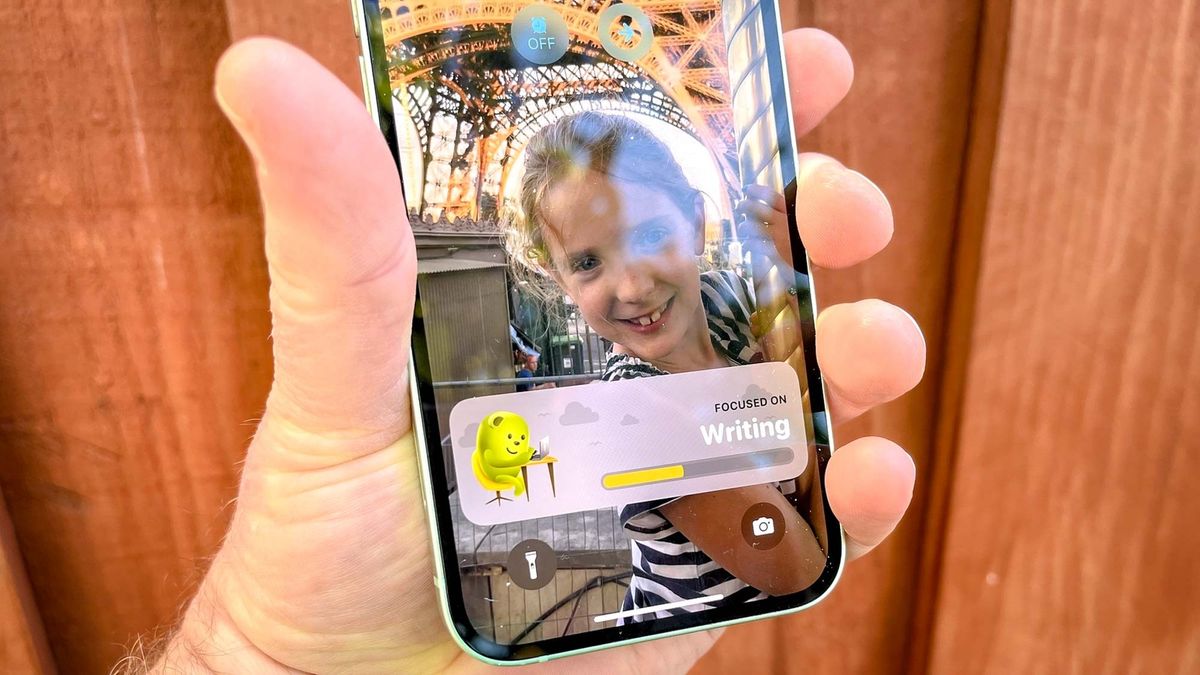
The arrival of iOS 16.1 brings another change to your iPhone’s lock screen in the form of Live Events. And app makers are jumping at the chance to include support for the new feature in their apps.
Live Events are alerts that appear on your lock screen and stay there, giving you updates on ever-changing statuses. Wondering where the cheeseburger you ordered through a food delivery app might be, or how the Warriors stack up against the Lakers? Live Events can bring this information to your lock screen with updates as cheeseburger delivery gets closer and closer as the Warriors embark on a new run against the hapless Lakers.
The arrival of the iPhone 14 Pro and iPhone 14 Pro Max adds another destination for Live Events. Both of these phones have gotten rid of the notch seen on iPhones since 2017 and have been replaced by Dynamic Island. While its main purpose seems to house the phone’s front camera and Face ID sensors, Dynamic Island can also be a place where notifications appear, giving you another space to interact with Live Activities.
While iOS 16 was released in September, Apple held back Live Events until the iOS 16.1 update. But as iPhone users upgraded, a series of app updates soon followed as third-party developers tried to show how their software could take advantage of Live Events.
Countdown timers have proven to be a popular Live Event for applications ranging from productivity tools to workout apps. But we’ve also seen Live Events that can share weather data, flight info, and sports scores.
We spent some time going through App Store updates to find apps that take advantage of Live Events. While not a complete list, the 11 apps below definitely caught our eye, bringing more browsable information to your attention, giving you a general idea of how Live Activities will work with the lock screen and Dynamic Island.
structured

Structured is a day planner and time management app that puts all your tasks and calendar items in one place, giving you a clear outline of what you need to do on a given day. The app has added a countdown clock that shows how much time is left for a particular task, accessible from the Lock Screen (or Dynamic Island if you have an iPhone 14 Pro).
You can download Structured for free, but some of its features require a subscription, including notifications and integration with the built-in Reminders app. You can sign up for a monthly ($1.99) or annual ($7.99) subscription, a $29.99 purchase gets you a lifetime membership.
download structured (opens in new tab)
flying

From flight route to delay forecasts to weather forecasts, Flighty flight tracking app puts a wealth of information at your fingertips. Flighty for iOS 16.1 brings this information to the lock screen and Dynamic Island with a Live Event alert that shows arrival and departure times, gate information, and flight status.
Flighty is a free download and this version already contains a lot of vital flight information. More advanced features like delay predictions, push alerts, and live inbound flight tracking require a Flighty Pro subscription ($5.99 per month or $49.99 per year).
download flying
Smart Gym

If you’re using SmartGym to keep track of your workout routines, you’ll want to get the latest update that adds Live Activity support. With Live Activities, you can start a timer to display the lock screen and also get guidance for your next set or workout. Dynamic Island support lets you monitor rests and execution during a workout.
You can try SmartGym for free with support for two routines, 10 history and two measures. A subscription ($9.99 per month or $59.99 per year) gives you unlimited access to all this stuff, plus the ability to sync data with SmartGym’s cloud service.
download SmartGym (opens in new tab)
awakening

Waking up is a boon for desk-bound workers who don’t want a sedentary profession to intrude into their lifestyle. The app offers workout breaks that you can do at your desk to stay active and alert, and also helps you focus on the tasks at hand with a countdown timer to help you stay on task until your next Wake-up break. With Live Activities, this timer moves to your phone’s lock screen.
You can try Wakeout a week before your subscription starts. One month of Wakeout costs $12.99 per month, and a lower monthly fee is offered when you sign up for one year.
download awakening (opens in new tab)
Carrot Weather

Live Activities in Other Weather Apps
• Alpenglow (opens in new tab)
The Carrot Weather update for iOS adds the Rain Soon Live Event, which appears on your lock screen when rain is expected in the next hour. A rain graph that appears along with the Live Event lets you keep track of the incoming storm.
While you can download Carrot Weather for free, Live Event for It’s Starting to Rain requires you to sign up for the app’s Premium Ultra tier, which costs $29.99 per year.
download Carrot Weather (opens in new tab)
General store

Live Activities for Other Food Apps
• croutons (opens in new tab)
• Crumbled Cookies (opens in new tab)
• Mela (opens in new tab)
• pestle (opens in new tab)
Grocery Store provides a place to jot down the things you need the next time you rush to the store, and a new Live Event for the app will make that list visible on your lock screen or Dynamic Island of your iPhone 14 Pro. If you store the recipes in the Grocery – you can, you know – there’s a countdown timer that shows up as a Live Event.
Grocery is a free download, but membership unlocks premium features like family sharing and pantry tracking. This will cost you $3.99 per month or $9.99 per year. A $29.99 payment gives you lifetime access.
download General store (opens in new tab)
Just press Save

Live Activities in Other Utilities
• Calzy (opens in new tab)
• Passwords (opens in new tab)
• TV Remote Control (opens in new tab)
Just Press Record does the trick when it comes to one-touch recording, and Live Activities are just as simple. While recording a note, lecture, interview, or pretty much anything else, a controller will appear on your iPhone’s lock screen, giving you quick access to pause or stop the recording.
Just Press Record is a $4.99 download with features that go beyond what iOS 16’s built-in Voice Memos app offers.
download Just press Save (opens in new tab)
Sports Alerts

Live Activities in Other Sports Apps
• FotMob (opens in new tab)
Sports updates are seen as a popular feed for Live Events, and one of the first apps to jump into it is the aptly named Sports Alerts app. Currently supporting the Big Four sports leagues in the US (MLB, NBA, NFL and NHL), Sports Alerts allow you to start a live activity up to six hours before game time. Live Activity will stay on your lock screen and notify you of any score changes without needing to unlock your phone.
You can download Sports Alerts for free. An in-app purchase of $4.99 gets rid of all ads for a year.
download Sports Alerts (opens in new tab)
Tide Guide

The Tide Guide is excellent at giving you tide information and solar charts in an easy to understand format. An update for iOS 16.1 allows you to view the current tide height, sun or moon altitudes, and information about when the next tide will come, whether it will appear on your lock screen or Dynamic Island on iPhone 14 Pro models.
You can download the Tide Guide and use it for free for three days before a subscription starts. Tide Guide charges $4.99 per month or $29.99 for a full year.
download Tide Guide (opens in new tab)
Money Trolley

The budget app MoneyCoach helps you manage your spending and track your bills with an eye toward building healthy money habits. With Live Activities, you will see transactions appear on the lock screen along with how much you spent in that particular category for the currency tracking period and a comparison with previous spending. iPhone 14 Pro owners can see this data in Dynamic Island.
You can download MoneyCoach for free, while a $34.99/year subscription unlocks the app’s Premium features.
download Money Trolley (opens in new tab)
Lumy

Lumy tracks sunrise and sunset to help photographers and videographers capture a perfectly lit shot. (Clue that this is a photo-focused app? One of the main things Lumy watches is when the Golden Hour is around and the lighting is at its most photogenic.) The app’s update for iOS 16.1 lets you track any solar event. From gold to first light, on your lock screen or Dynamic Island.
A $6.99 purchase gives you full access to Lumy and all of its features.
download Lumy (opens in new tab)
Aucun commentaire
Enregistrer un commentaire